Slow day…
Not much going on in wwbd land today (I’m sick).
So I’ll leave you with the following political cartoons:


I’ll be back in action again soon… and the suckage will continue with a vengance!

Not much going on in wwbd land today (I’m sick).
So I’ll leave you with the following political cartoons:
I’ll be back in action again soon… and the suckage will continue with a vengance!
I felt like total crap when I got up today, but being the idiot I am, I went to work anyway.
It got much worse. Good times!

I made about an hour and a half before I had to go home. Guess I should have listened to my body this morning.
I’ve also been upgrading the wordpress installs on the server to get everything current. Unfortunately, this means that custom themes have to be re-done (and that takes time). I’ve pretty much finished Moxie’s website (plus or minus a few tweaks). Next comes JC’s page (which should take a whopping 5 minutes).
Today, I received a number of servers from our vendor. Normally, they would order all the parts, assemble and test the server, then ship it to us. Unfortunately, someone made a mistake and the PO got lost.
So, they did a drop-ship from HP directly to us (it’s faster that way). 3 days later… I was in possession of half a dozen beautiful new DL320 G3 SATA servers.
Since it was drop-shipped, they didn’t install the CD, hard drive, floppy, or ram… but hey… I can do that.
Or can I?
It seems that they forgot one small part… the SATA backplane (and it’s supporting cables). For those of you who are fortunate enough to not have made the computer industry, I’ll explain. It’s a board that the hard drives plug directly into that supplies power for the drives and hooks the drives to the motherboard.
So… unless I can figure a way to get data two and from the drives without power or cables… I’m gonna have to wait until tuesday at the earliest to set these up (that’s when they’re going to send me the backplanes).
So, Mr. HP man…. in the future… when someone orders a server with SATA support AND also orders SATA hard drives to go in it… please provide the part the drive actually plugs into. To make your life easier, I’ve colored the parts you forgot (please print and hang in your cubicle, mktks!).
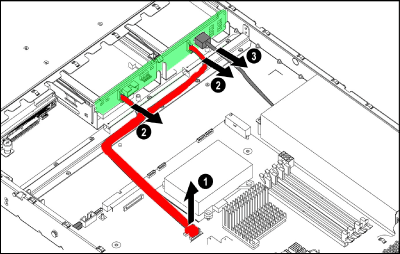
Green = SATA Backplane, Red = Cables (in case you can’t figure it out)
Today has been one of those days that make you just want to curl into a ball if you’re a computer professional.
One of our servers got hit with a worm, a friends blog got defaced, and another friend sent me an instant message asking if wuamk032.exe, rofl.exe, and edit.exe were normal to see in your task manager (um… no… they’re not…. your machine is owned).
So… for the 50,000th time… I beg all of you in intraweb land who use Windows:
STOP CLICKING ON EVERY DAMN ATTACHMENT YOU GET!!
I don’t care if it looks like it came from your priest, your grandmother, or God himself… if you weren’t expecting a file… don’t trust it.
Also, if your running windows, turn off the “Hide extensions for known file types” option. This has got to be the worst idea Microsoft has ever come up with (after Windows ME, of course).
KEEP YOUR ANTIVIRUS SOFTWARE TURNED ON AND UPDATE IT ONCE A FRIGGIN’ WEEK!!
This is like buying a gun for home security, not buying bullets, and keeping it in a safe in the basement. It can’t help you unless its there, on, and ready. If you can’t update it because you didn’t pay for the service… quit being a tight-ass and pay for it now!
RUN WINDOWS UPDATE ONCE IN A WHILE… IT’S FREE, DAMN IT!!!!
Bejesus… if there is one thing you can do to make your life easier, it’s to patch your PC for KNOWN SECURITY FLAWS! The thing that people try to exploit. So enable automatic updates. At a minimum you need the “Notify me but don’t automatically download or install” option so at least it tells you there’s an update.
If you don’t do the three things I just mentioned, you deserve whatever happens to your PC. And no… I will not help you.

Click to see animated gif (264kb) in new window.
Thanks to eddie for the image (don’t know where he got it from though).